
Getting featured isn’t a lottery you enter once. Apple says there is no checklist; its editors look at the user experience, UI design, innovation, uniqueness, accessibility, localization, and your product page, including screenshots, previews, descriptions and ratings.1
1. Have something worth a story
Editors feature moments: a launch, a meaningful update, new content, a season. Plan one and build the product page for it first: it’s part of what they review.1
2. Nominate in App Store Connect, early
Go to Apps → your app → Featuring → Nominations → “+” and pick a type: New Content, App Enhancements or App Launch. Describe the plan, set the date, attach related apps (up to 10), supporting links (up to five) or an approved In-App Event.2
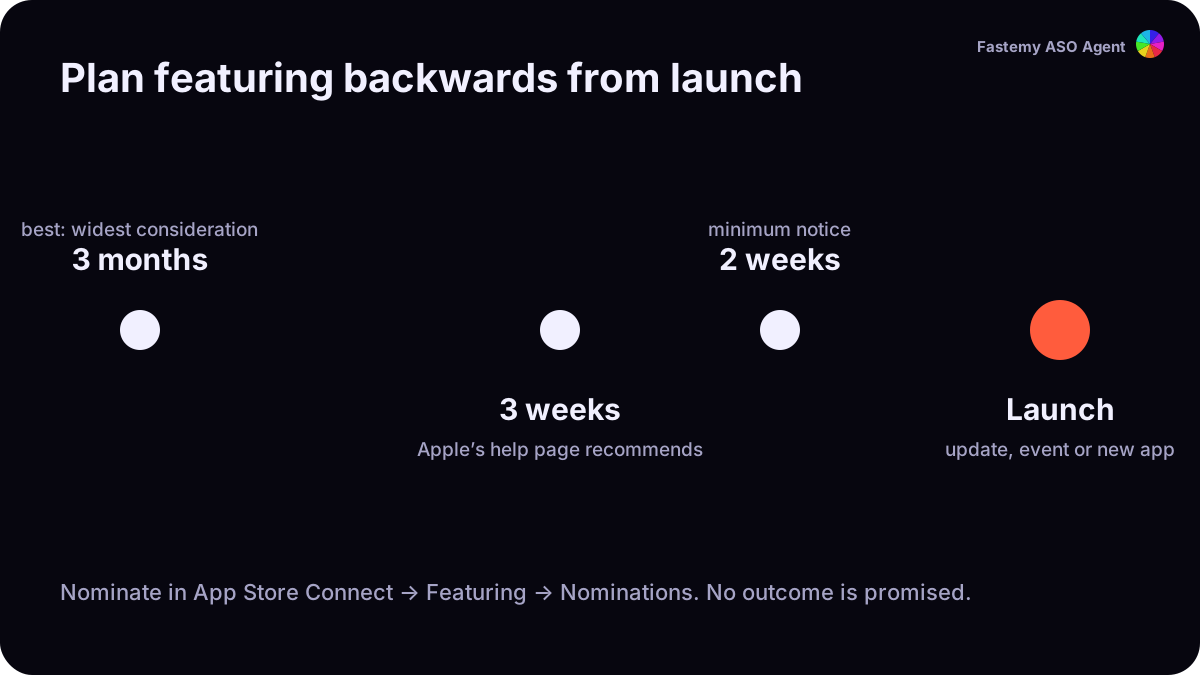
Lead time: Apple’s featuring page asks for at least two weeks’ notice and suggests up to three months ahead for wider consideration; its help page recommends at least three weeks.1 2 Aim for three weeks or more.
3. Use In-App Events
In-App Events appear on your product page, in search results, and in editorial and personalized picks on the Today, Games and Apps tabs; people can search for events directly. You can have up to 10 published at a time; each runs up to 31 days and can be promoted 14 days before it starts.3
4. On Google Play, meet the published bar
We found no public nomination form for Google Play in Google’s help pages. What Google does publish is the bar for its recommendation surfaces: at least four screenshots at 1080 px or more for screenshot-based formats,4 stability under the Android vitals thresholds,5 and fresh listings with high-resolution media.6
What we don’t promise
No one can promise a feature: Apple says it will consider plans, not that it will feature them.2 What you control is the story, the page and the timing.