
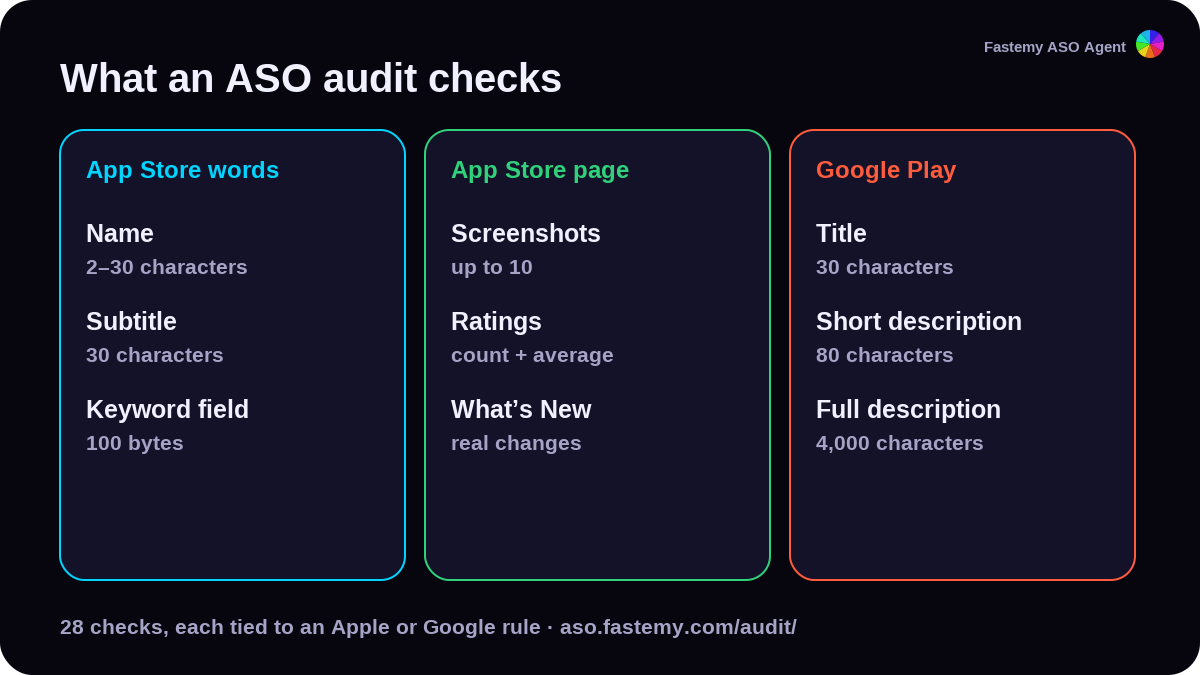
An ASO audit is a check of your store listing against what the App Store and Google Play actually use: the words search matches (name, subtitle and keyword field on the App Store; title and descriptions on Google Play) and what converts on the page (screenshots, ratings, updates, languages). Below are the 28 checks our free audit runs, each tied to an Apple or Google rule, in the order to fix them.
What an audit can and can’t tell you
An audit reads your listing and compares it with the stores’ rules. It can tell you that your keyword field has 31 unused bytes, that your subtitle repeats your name, or that “Best” in your Google Play short description goes against Google’s guidance. It can’t tell you which words people search, where you rank or what your competitors do: those need data collected over days, and both stores keep their ranking weights to themselves.12
Where a check uses a number Apple or Google publishes (30 characters, 100 bytes, 10 screenshots), we say so. Where the line is ours, such as 100 ratings or an update in the last 45 days, we say that too.
1. App Store: the words search reads
Apple ranks App Store search on text relevance (your name, subtitle, keywords and primary category) and on user behavior such as downloads and ratings.1 The words are the part you fully control, and they change with each version you submit.
| # | Check | The rule | Source |
|---|---|---|---|
| 1 | The name says what the app does | Two or more words: a one-word brand only matches searches for that word. 2–30 characters. | Apple3 |
| 2 | No price or claim words in the name | No “free”, “best”, “#1”, prices or emoji. | Guideline 2.3.74 |
| 3 | Subtitle within 30 characters | Up to 30 characters. | Apple3 |
| 4 | The subtitle adds new words | It explains value instead of repeating the name. | Apple5 |
| 5 | No price or claim words in the subtitle | Same rule as the name. | Guideline 2.3.74 |
| 6 | Keyword field within 100 bytes | Counted in bytes: accented and non-Latin letters take more than one. | Apple6 |
| 7 | The keyword field is full | Every unused byte is a term you could match. We pass it at 6 bytes or fewer left. | Apple1; line ours |
| 8 | No spaces around commas | term,term,term. Each space costs a byte. | Apple1 |
| 9 | No words already in the name or subtitle | Apple indexes those already; repeating them only takes room. | Apple1 |
| 10 | No singular and plural of the same word | Apple treats a plural as a duplicate. | Apple1 |
| 11 | No term listed twice | Delete the repeat. | Apple1 |
| 12 | No filler | Skip “app”, “game”, two-letter terms and your category name; keep special characters out unless they’re your brand. | Apple16 |
The subtitle and keyword field aren’t public, so the free audit asks you to paste them and checks them in your browser. For the field itself, see how to fill the 100-byte keyword field, and for every limit in one place, App Store and Google Play character limits.
2. App Store: what converts on the page
| # | Check | The rule | Source |
|---|---|---|---|
| 13 | iPhone screenshots | Up to 10; the first 1–3 show in search results when there’s no preview video. We pass 5 or more. | Apple57; line ours |
| 14 | Ratings count | Ratings and reviews are part of user behavior Apple ranks on. We pass 100 or more. | Apple1; line ours |
| 15 | Average rating | Reply to low reviews and fix the cause; Apple lets you reset the summary rating with a new version, sparingly. We pass 4.5★ or higher. | Apple8; line ours |
| 16 | Last update | Google lists regular updates as part of a great experience in its search guidance. We pass an update in the last 45 days. | Google2; line ours |
| 17 | What’s New text | It describes significant changes, not “Bug fixes”. We pass 60 characters or more. | Guideline 2.3.124; line ours |
| 18 | The first sentence of the description | It matters most: say who the app is for and what it does, without keyword stuffing. We pass 40–250 characters. | Apple5; line ours |
| 19 | Languages | Each App Store localization carries its own name, subtitle and keywords. We pass 5 or more. | Apple9; line ours |
| 20 | Secondary category | Pick one; your primary category is part of text relevance. | Apple1 |
| 21 | iPad screenshots | If your app is built for iPad, Apple needs a 13-inch iPad set. Information only. | Apple7 |
To find out which screenshots convert better, test them: Apple’s Product Page Optimization tests icons, screenshots and previews against your current page10 (how to run store A/B tests). For ratings, when to ask and how to answer reviews.
3. Google Play: title and descriptions
On Google Play there’s no keyword field: search reads your title and descriptions, and Google warns against repeated or unrelated keyword lists.1112
| # | Check | The rule | Source |
|---|---|---|---|
| 22 | Title within 30 characters | 30 characters or less. | Google12 |
| 23 | Title follows the metadata policy | No emoji, ALL CAPS (unless it’s your brand), ranking claims such as “#1” or “App of the year”, or price and promo text. | Google12 |
| 24 | Short description within 80 characters | Up to 80. | Google11 |
| 25 | No promo words in the short description | Google asks for no “free”, “discount”, “#1” or “Best” here. | Google13 |
| 26 | Full description within 4,000 characters | Keep it succinct: people may read only the first sentences. | Google13 |
| 27 | The short description isn’t repeated | Open the full description with a different sentence. | Google13 |
| 28 | No word repeated heavily | Heavy repetition can be treated as a policy issue. We flag a word above 4% of the text. Information only. | Google12; line ours |
Google Play’s store listing experiments can also test descriptions, which Apple’s tests can’t.14 More in how to rank on Google Play.
Run the 28 checks in two minutes
The free audit runs all of this for you:
- App Store: paste your App Store link. It reads your public listing from Apple’s lookup API and runs checks 1–2 and 13–21; paste your subtitle and keyword field for 3–12.
- Google Play: paste your title, short and full description for checks 22–28.
Each check shows the rule, the source and the fix, sorted by how many points it costs you. It runs in your browser, with no sign-up.
Hand the audit to an AI agent
If you work with Claude Code, Cursor or another coding agent, give it aso.fastemy.com/audit.md. It lists every check with the field to read from Apple’s public lookup API and the rule to apply, so the agent can audit your listing and draft fixes without a key or a Fastemy API. The wider playbook, from research to measuring a change, is on the page for AI agents.
Keep an audit report
An audit is most useful as a before-and-after record. For each change, write down:
- The date and version you submitted.
- What changed, word for word (old and new name, subtitle, keyword field, screenshots).
- The numbers before: App Store Connect impressions and conversion rate, or Google Play Console’s search terms, for the 14 days before.
- The same numbers 14 days after, against the same number of days before the change.
Change one thing at a time, or you won’t know which one worked. In version 2026-11-08 of our dataset of public cases, 147 of 766 changed the name, subtitle or keyword field: 129 report a win, 13 are mixed, 3 had no effect and 2 lost. Teams and vendors mostly publish wins, so read that as a ceiling (what the 766 cases show).
What we don’t promise
Passing every check doesn’t guarantee a rank or a download count. Apple and Google don’t publish how they weigh ranking factors, and the point values and thresholds marked “ours” are our judgment, not theirs. The audit reads your listing as it is today; it doesn’t see search demand, your rank or your competitors.