
App Store localization means translating and adapting your store listing for each language you sell in. Apple lets you localize App Store metadata in 50 languages and locales, and every storefront reads a default language plus, in 104 of 175 storefronts, more.1 Google Play adds free machine translation and shows an automated translation where you haven’t added one.2
1. What to localize on each store
| App Store | Google Play | |
|---|---|---|
| Words search reads | Name, subtitle and keyword field, per language34 | Title, short and full description2 |
| Words people read | Description, What’s New3 | Short and full description |
| Images | Screenshots and previews, per language4 | Localized graphics; without them, your default graphics show2 |
| Language you didn’t add | Apple chooses from the languages you added, by storefront and device settings1 | People can view an automated translation of your listing2 |
Apple’s own advice: if your app is available in several languages, localize the description, keywords, previews and screenshots for each market you offer it in.4
2. Which languages each App Store storefront reads
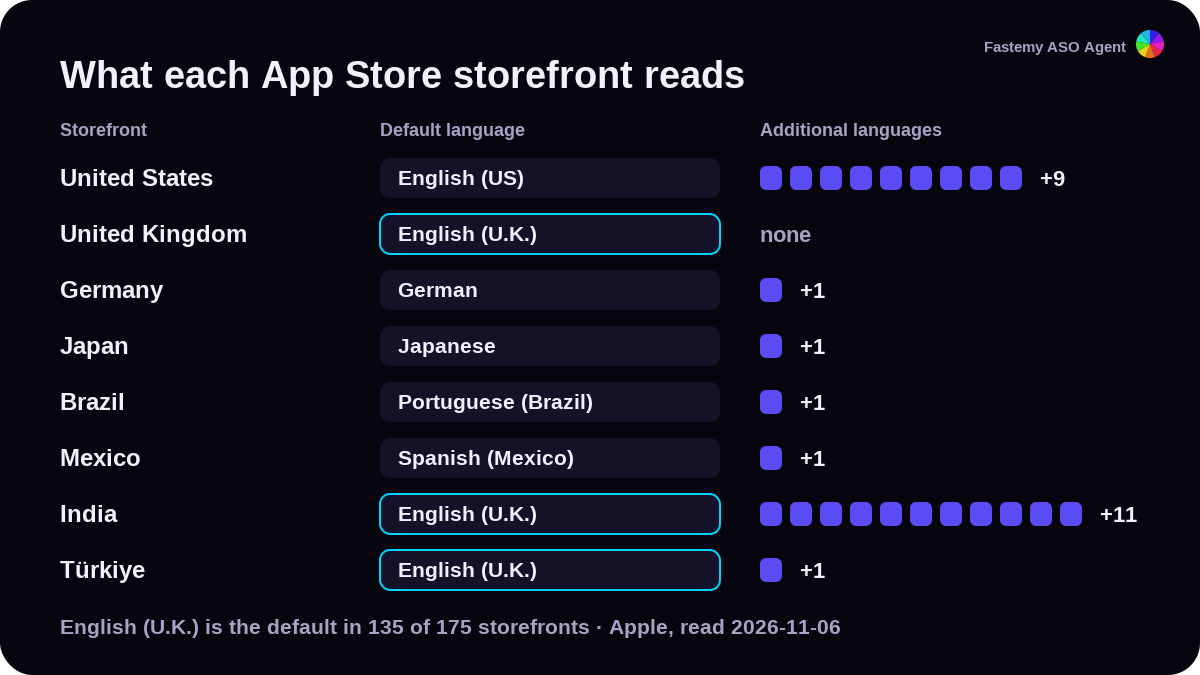
Apple publishes a default language and the additional supported languages for each storefront.1 We counted the table on 6 November 2026:
| Storefront | Default language | Additional languages |
|---|---|---|
| United States | English (US) | Arabic, Chinese (Simplified), Chinese (Traditional), French, Korean, Portuguese (Brazil), Russian, Spanish (Mexico), Vietnamese |
| United Kingdom | English (U.K.) | none |
| Canada | English (Canada) | French (Canada) |
| Australia | English (Australia) | English (U.K.) |
| Germany | German | English (U.K.) |
| France | French | English (U.K.) |
| Japan | Japanese | English (US) |
| Brazil | Portuguese (Brazil) | English (U.K.) |
| Mexico | Spanish (Mexico) | English (U.K.) |
| India | English (U.K.) | Bangla, Gujarati, Hindi, Kannada, Malayalam, Marathi, Odia, Punjabi, Tamil, Telugu, Urdu |
| Türkiye | English (U.K.) | Turkish |
Three things stand out:
- English (U.K.) is the default in 135 of 175 storefronts and supported in 172. English (US) appears only in the US and Japan. If your only English listing is English (US), most storefronts don’t list that language.
- Spanish (Mexico) is the default in 16 storefronts and supported in 19.
- The US storefront lists ten languages. Apple doesn’t say how it weights a localization that isn’t the storefront’s default in search, so treat any extra keywords you add there as a test, not a rule.
3. Choose your first languages
- Look at your own numbers first. In App Store Connect analytics and Play Console, break impressions and downloads down by country. A market already finding you in English is the cheapest one to win.
- Add the default language of each storefront you want. For most of the world that’s English (U.K.); for Latin America, Spanish (Mexico).
- Write keywords for that market, don’t just translate them. One developer added the Chinese word for piano (钢琴) as a keyword and reported reaching #1 among iPad music apps in China.5
- Translate the screenshots’ captions too, at least the first three, which can show in search.4
- Ship, then measure for 14 days against the same days before, country by country.
4. What six solo developers’ numbers show
In our open case dataset, 99 public cases include localization. Six were done by one developer alone:
| App | What changed | Result |
|---|---|---|
| ListTimer | Name and description translated into about seven languages | Daily downloads from Korea, China, Taiwan and Russia went from almost zero to about 6–14 each a week later; overseas share from about 10% to 30%6 |
| synchroClac | Title, description and keywords machine-translated into 14 more languages | About 1.5 times the downloads and impressions of the same period a month earlier, mostly from China and Korea7 |
| Tiny Piano | Chinese keyword added | #1 among iPad music apps in China, later in 41 countries5 |
| An indie paid app | New name, subtitle, keywords, description and Spanish (Mexico) metadata at once | Impressions doubled; profit almost doubled8 |
| Clay Sniper | Keywords rewritten, locales grown from three to eight | US and Europe share of App Store impressions from 3% to 68% in about a month (an Apple Ads pilot ran too)9 |
| SafeYourEye | New name, subtitle, keywords and three new locales | “eye strain” rank in the UK from #130 to #9, but no new installs that month9 |
Five of the six report a win. Most changed several things at once, so localization alone can’t take the credit.
5. What all 99 cases show, and why to read them carefully
| cases | |
|---|---|
| Cases that include localization | 99 |
| Report a win | 96 |
| Mixed result | 3 |
| Give a conversion-rate change in % | 27 (median 20%, middle half 7.2–41.5%) |
| Give an install change in % | 57 (median 45%) |
| Localization was the only change | 9 (all wins) |
| Published by companies that sell ASO | 72 |
How we counted: the first conversion-rate or install change each source states as a percentage, once per case; we don’t compute percentages a source didn’t give. Recount from /data/aso-cases.json (version 2026-11-03).
No published localization case in the dataset backfired. That says more about who publishes than about localization: teams and the companies that sell ASO publish wins. For the same reason across all levers, see does ASO work?
6. Machine or human translation?
Google Play offers free machine translation for store listings in Play Console, and paid human translation from a third-party vendor from USD 0.07 a word, delivered within seven days.2 synchroClac’s 14 App Store languages were machine-translated.7 Whatever you use, have a native speaker read the name, subtitle and the first lines of the description: those are what search and people see first.
What we don’t promise
Apple and Google don’t publish how much each localization counts in search. The cases are as stated by their sources, not audited, and most bundle localization with other changes. A translated listing opens a door; it doesn’t guarantee a rank or a download count.
Next: write the keywords for each language with the App Store keyword guide, or see what 40 solo developers changed.
Sources
-
Apple Developer: App Store localizations (read 6 November 2026) ↩ ↩2 ↩3
-
Play Console Help: Translate and localize your app ↩ ↩2 ↩3 ↩4 ↩5
-
Apple Developer: Required, localizable, and editable properties ↩ ↩2
-
squarepoet: One year on the App Store (2013, Wayback Machine copy) ↩ ↩2
-
John MacAdam: How I doubled App Store impressions (Wayback Machine copy) ↩
-
Kirill Lukyanov, DEV Community: ASO on my own apps (2026) ↩ ↩2